Run Privacy Check
Review a structured local report before a private document leaves your machine.
- Ready, Needs review, or High risk status
- Grouped findings by risk type
- No upload and no network dependency
Trust Pack for private PDF sharing
Offline PDF Editor v1.0 is for Legal, HR, and Ops PDFs you are not allowed to upload. Check before sharing, clean private PDFs locally, and save proof of what changed.
One-time purchase. No editor account. No subscription. No file upload workflow.
Personal first-visit reminder stored on this device. The Gumroad checkout page shows the current available price.
After checkout
The lifetime license is $28 USD via Gumroad during the soft launch. Regular price $49. Gumroad handles checkout and delivery; daily PDF editing stays local.
Best for routine private PDF workflows. Not a compliance certification product, mobile editor, or full Acrobat prepress replacement.
v1.0 Trust Pack
Check before sharing, clean private PDFs locally, and save proof of what changed. Trust Pack is built for Legal, HR, and Ops workflows where a file may contain hidden metadata, links, comments, form values, signatures, attachments, scripts, searchable OCR layers, or unsafe covered text.
Review a structured local report before a private document leaves your machine.
Strip common hidden/share-risk structures while preserving visible text and vector content where possible.
Rasterize pages into a fresh PDF when the safest explanation is a flattened copy.
60-second product demo
Open a local PDF, redact sensitive fields, edit text, OCR a scan, compare versions, sign, and save back to your device. The video uses the real app UI.
Why offline matters
Contracts, statements, scans, IDs, HR documents, board packs, invoices, and client files should not require an upload, an account, or another recurring subscription just to make a routine edit.
Product proof
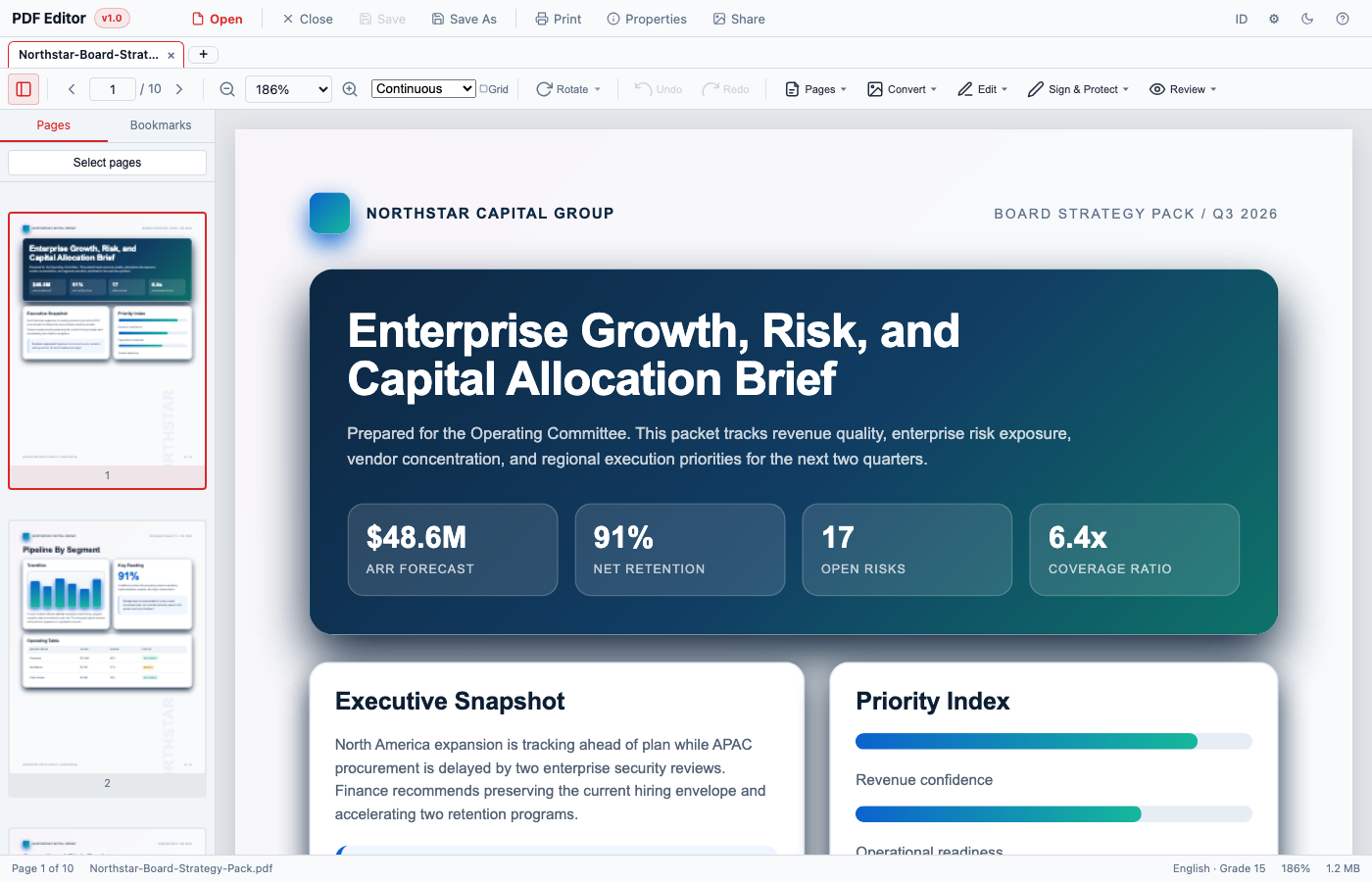
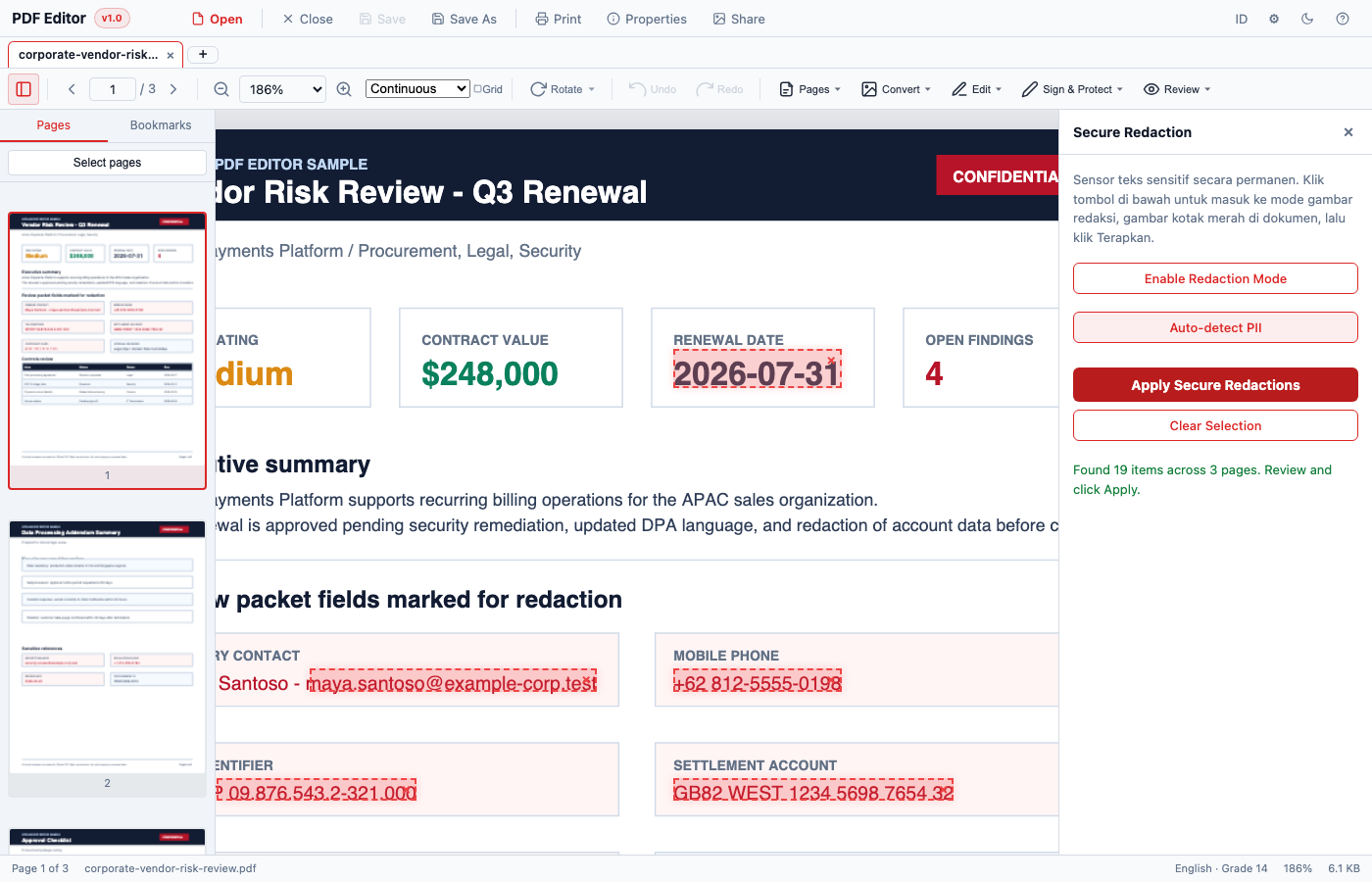
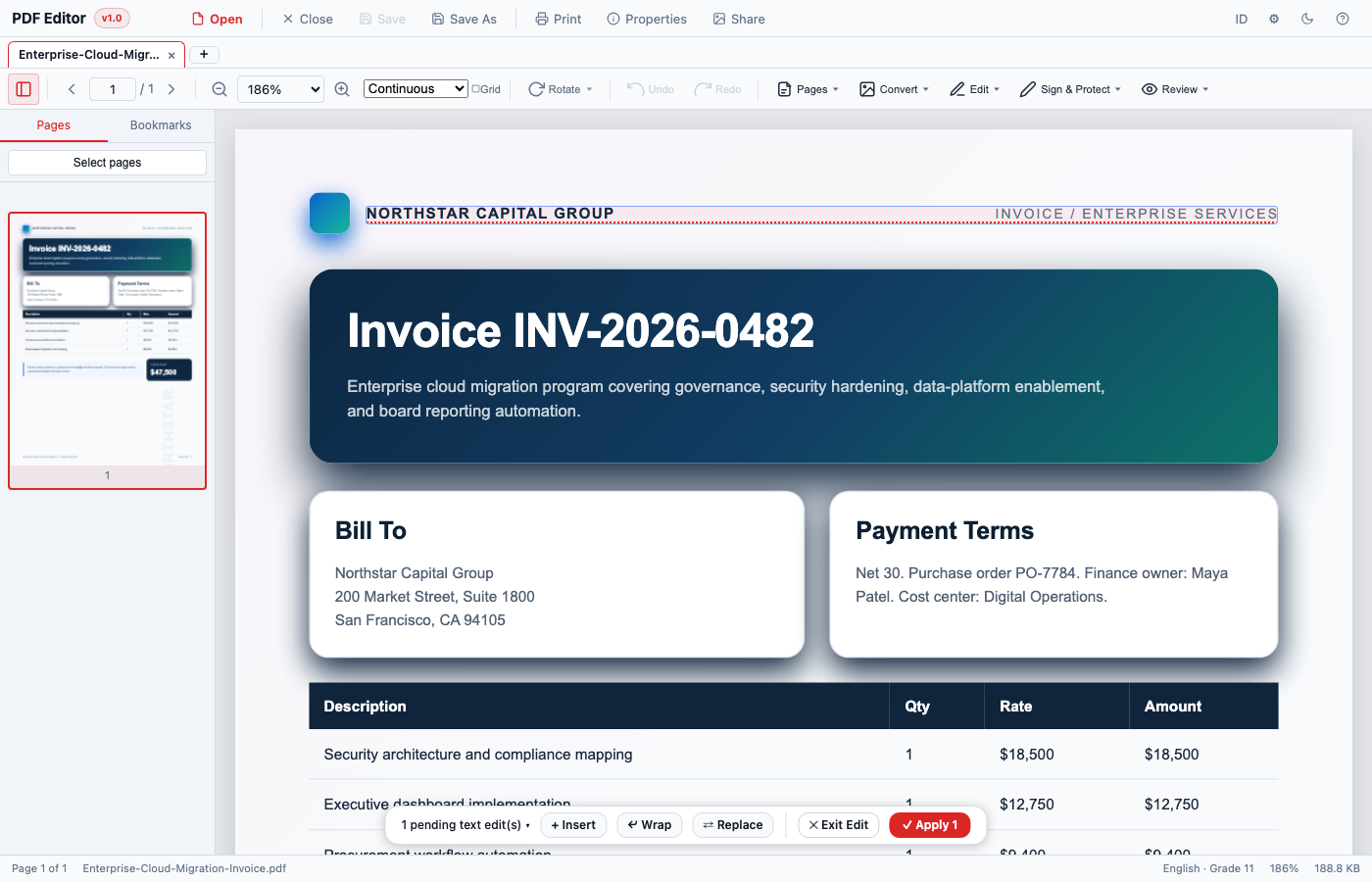
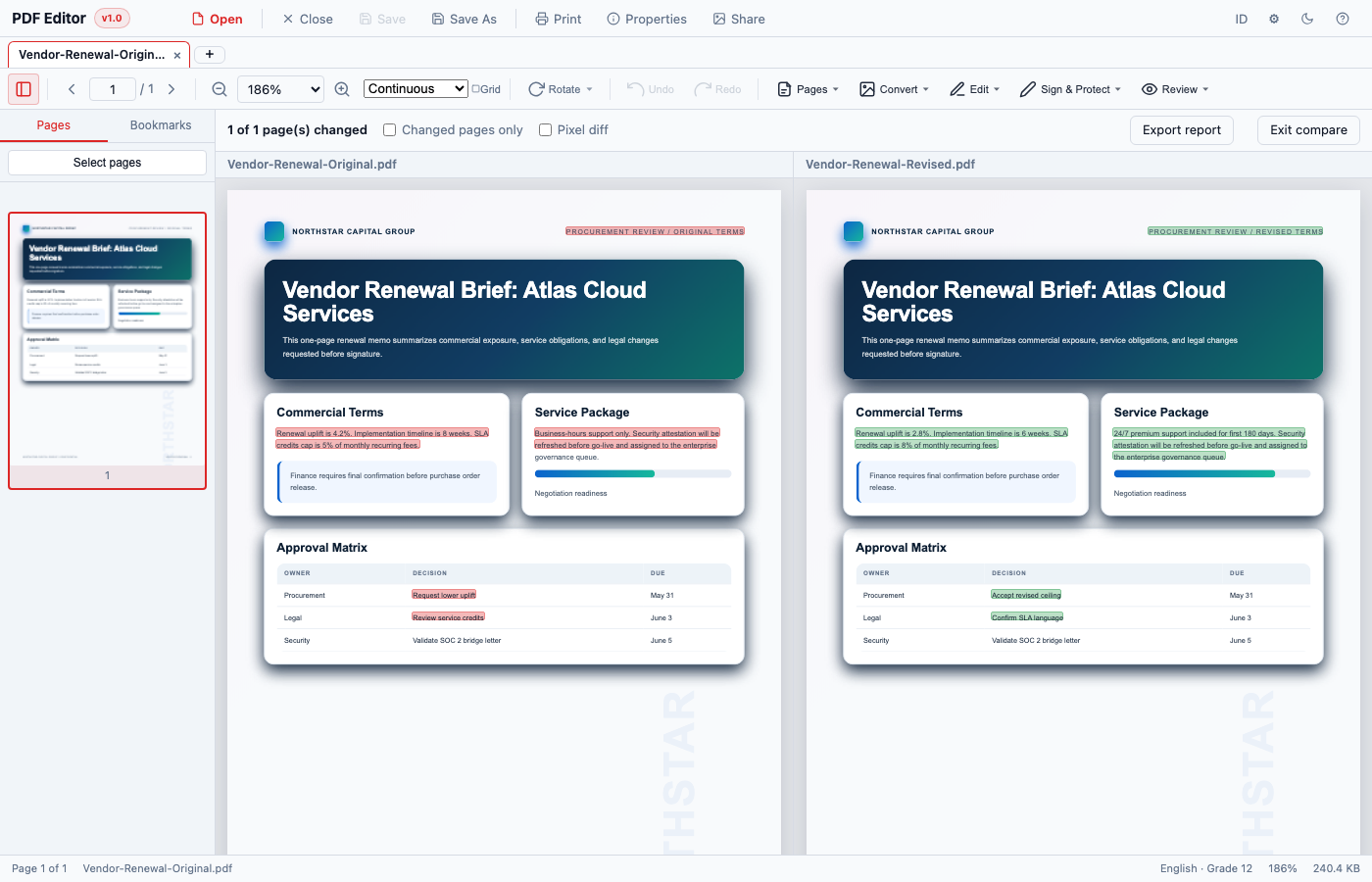
Real app screenshots: open a PDF locally, redact private fields, edit text, OCR scans, compare versions, and save outputs on your device.
Feature grid
Offline PDF Editor is an Acrobat alternative for routine local PDF workflows: offline OCR, redaction, signing, page organization, and PDF export without a subscription.
Make document changes without leaving the local workspace.
Prepare private documents before they leave your machine.
Turn scanned PDFs into searchable text with bundled OCR.
Approve, mark up, and prepare PDFs for sharing.
Review changed PDFs side by side.
Move outputs into the format your workflow needs.
Use it your way
Use the browser app for preview and portable workflows. The paid Gumroad package includes the portable HTML app and macOS desktop app files.
Open the single-file editor in a modern browser. Great for locked-down devices where installing software is not practical.
The macOS app packages the same offline editor with native open/save paths and a desktop app icon.
Privacy proof
No cloud upload is part of the editor workflow. You choose files from your device, the browser or desktop app processes them locally, and you save outputs back to your device.
PDF rendering, editing, OCR, redaction, compression, signing, and export run inside the browser or app using bundled libraries. Smoke tests for the portable app assert zero outbound network requests.
Good fit for
Sign, compare, redact, and save contract packets locally.
Edit routine details, OCR scans, export tables, and compress for email.
Redact account details before sharing with advisors or clients.
Review long PDFs with thumbnails, spread view, search, and compare.
Run offline OCR and create searchable PDFs without uploading pages.
Watermark, flatten, password protect, and export local copies.
Comparison
Adobe Acrobat, Smallpdf, and iLovePDF are useful in different situations. Offline PDF Editor focuses on private, local, routine document work with no upload step and no monthly subscription.
| Need | Offline PDF Editor | Adobe Acrobat | Smallpdf | iLovePDF |
|---|---|---|---|---|
| Private file workflow | Local workflow with no cloud upload step. | Powerful desktop suite, often subscription-oriented. | Convenient cloud-first PDF tools. | Convenient cloud-first PDF tools. |
| Offline use | Portable web app and macOS app are designed for offline use. | Desktop app can work locally after install. | Most workflows require internet access. | Most workflows require internet access. |
| Setup | No editor account; portable HTML or macOS app. | Installed suite and account/subscription flow. | Web account and upload-oriented workflow for many tasks. | Web account and upload-oriented workflow for many tasks. |
| Cost model | Soft-launch $28 lifetime license; regular price $49 later. | Usually recurring subscription or suite pricing. | Free tier plus paid limits/subscription plans. | Free tier plus paid limits/subscription plans. |
| Best fit | Private PDFs, offline OCR, redaction, signing, comparison, and routine edits. | Enterprise-grade PDF suite workflows. | Fast online conversions and low-risk public files. | Fast online conversions and low-risk public files. |
Simple pricing
The lifetime license is $28 USD via Gumroad during soft launch. Gumroad handles secure checkout and file delivery; the editor itself is used locally after download.
Portable Offline PDF Editor v1.0 for web and macOS.
Soft-launch price $28
Personal first-visit window: 48:00:00
Secure Gumroad checkout opens in a new tab. The checkout page shows the current available price.
Privacy FAQ
No, PDF files are not uploaded by the editor workflow. You choose files from your device, process them locally, and save outputs back to your device.
You receive access through Gumroad. The purchase includes the portable HTML app, the macOS desktop app, receipts, and Gumroad re-download access. Windows app support is planned.
Yes. Offline PDF Editor v1.0 is designed to run from a portable single-file HTML app or macOS desktop app. The editor workflow does not require uploading PDFs to a cloud service.
Yes. v1.0 includes a macOS desktop build with native open/save behavior and a dedicated app icon.
Trust Pack adds Privacy Check, Save Clean Copy, Save Maximum Clean Copy, and Save Privacy Report workflows for common hidden-data and sharing-risk cleanup. It is not a legal certification or malware scanner.
Windows packaging is planned and the desktop project is configured for an NSIS build, but the page avoids promising a Windows download until the Windows artifact is shipped.
Very large PDFs can be limited by browser or device memory. OCR is focused on English and Indonesian Latin text. Word export quality varies with PDF layout complexity. Windows packaging is planned but not shipped yet.
Yes. The portable HTML app opens in a modern desktop browser and is useful on devices where admin install rights are limited.
Use a modern desktop browser such as Chrome, Edge, Firefox, or Safari. Very large PDFs can still be limited by browser memory.
Yes. OCR is bundled into the app and runs on-device for English and Indonesian Latin text.
The secure redaction workflow is designed for destructive removal when applied, but you should review every redaction before saving because redaction is irreversible by nature.
Adobe Acrobat is a powerful and established PDF suite. Offline PDF Editor is lighter and focused on local private PDF workflows with a one-time license.
Smallpdf and iLovePDF are convenient online services. Offline PDF Editor is for people who want an iLovePDF or Smallpdf alternative without uploading files.
You can use it for company documents when your own policies allow local browser or desktop tools. It is not marketed as a compliance certification product.
Keep one local PDF workstation ready for editing, OCR, redaction, signing, comparison, compression, and export.